Remarks INPUT SYSTEM PASSWORD Format: * 01 abcd # Explanation: abcd is the password, The default password is 1234. CHANGE THE PASSWORD Format: * 02 abcd # Explanation: abcd is the new password. The system must be unlocked before programming. EXTERNAL (CO)LINE CONNECTION ASSIGNMENT Format: * 3 a b c d e f # Explanation: [a、b、c、d、e、f、]stand for the CO line port number Description: Set CO line(s) to external line port(s) Example: If a company has 3 CO lines and he want connect 3 CO lines to CO line ports 1, 2&4, then he can use the following commands: Pick up 801 and unlock input *3124# “Du” Hang up <1> Normally the order to set the CO line port is from port one to port two, Port three … one by By one, but for some situation you could ignore one port and jump from port one to port two. (for the above example) <2> For the CO line, you`d better set the incoming calls high-frequently-used one to the port of high position, while for the out-going one to the low-position port. <3> If the setting is wrong, you may hear nothing after dialing〝0〞. <4> The system can be used as internal communication system in case of no CO. line (you can input * 3 # ). RINGING EXTENSION ASSIGNMENT FOR EXTERNAL (CO)LINE Format: * 1 m abcd # Explanation: "m" is the CO line port number. "a、b、c、d": is the last digits of extensions. Description: Assign the extensions, which will ring when incoming call from CO line is received. Example: If you wish extension 802 to ring from an incoming call for CO line 1,and extensions 802 and 806 to ring for CO line 2 incoming calls, then you may perform the following operation: 1) Pick up 801 extension. (2) input * 1 1 2 # (3) you will hear "du" then hang up (4) Pick up 801 extension (5) input * 1 2 3 6 # (6) you will hear "du" then hang up <1> the default ringing extensions are extensions 801— 804. <2> Ringing extensions must be among extensions 801— 808. <3> At most 8 extensions can be set to ring for one CO line, if the ringing extensions less than 8 then end with #. <4> The system must be unlocked before programming. EXTERNAL DIALING MODE ASSIGNMENT EXTERNAL DIALING MODE FOR SPECIFIC EXTENSION ASSIGNMENT Format: *8 abc n # Explanation: [abc] The extension number. [n=0] means extension dial〝0〞or patting hook to dial out. [n=1] means extension can directly make outgoing calls. Description: You can make the outgoing call directly with the direct-out mode extension, while you want to make an internal call, you need to dial * first followed by the extension number. Example: Set Direct Dial out mode for extension 803. Pick up 801 and unlock input *88031# “Du” Hang up <1> Extensions with direct dial-out mode make internal calls should dial * first followed by extension number. <2> The default mode of dial-out for all extensions are dial 0 first then dial out. DIRECT EXTERNAL DIAL MODE CLEAR Format: *8000 # Description: To reset Direct Dial Mode to the default setting for all extensions. ATTENDANT
MODE ASSIGNMENT Format: * 2 1 # Pick up 801 input *21# “Du” Hang up
AUTO ATTENDAMT ASSIGNMENT WITH
OGM FOR DESIGNED CO LINES Format: * 2 0 m# (“m” is the CO line port number) Example: Set CO line 2 at Auto-Attendant mode. Pick up 801 input *202# “Du” Hang up <1> Suggest to restore all the CO line to operator mode first by *21# to avoid duplicate setting. <2> To set Auto-Attendant mode for all CO line, input the *20#
OPERATOR NO1 ASSIGNMENT FOR AUTO ATTENDANT MODE Format: * 2 5abc# (abc=extension number . Default setting=Ext.802) Description:Assign an extension to be Operator No1 for Auto Attendant Mode.When external caller dial 0,his call will be transferred to operator. Example: Assign extension 807 to be Operator No.1. Pick up 801and unlock input *25 807# “Du” Hang up
OPERATOR NO2 ASSIGNMENT FOR AUTO ATTENDANT MODE Format: * 2 6abc# (abc=extension number . Default setting=Ext.803) Description:Assign an extension to be Operator No2 for Auto Attendant Mode.The incoming call will be auto transferred to be Operator No2,if Operator No1 is busy. Example: Assign extension 806 to be Operator No.2. Pick up 801and unlock input *26 806# “Du” Hang up <1> The system will select an idle extension among 802 to 808 to answer the external call when both of operator extensions are busy.
RECORD THE OUT GOING MESSAGE(3 PIECE OGM) Format: * 2 2 N# N=1=OGM 1=Maximum 12 seconds N=2=OGM 2=Maximum 4 seconds N=3=OGM 3=Maximum 4 seconds Description: Allows the extension assigned as an operator or manager to record uo to 3 outgoing voice message.This message is played when a external caller accesses the DISA feature. Example: OGM1: “This is a company ,for sales division ,press 812 ,for the service division press 824 ,to call operator press 0” Description: The unit will answer the call and play an out going message. The calling party has the option to dial the number of the internal extension directly or dial 0 for the operator. OGM2: “We are sorry. The line is currently busy ,you could dial other extension number ,if you want to call the operator ,press 0” Description: The unit will play out going message in the case of desired extension is busy. If the external caller does not enter any correct extension number within a certain period , then the call will be released OGM3: “We are sorry. The line is no answer ,you could dial other extension number ,if you want to call the operator ,press 0” Description: The unit will play out going message in the case of desired extension is no answer after the caller dial the extension number within a certain period .If the external caller does not enter any correct extension number within a certain period , then the call will be released
PLAY THE OUT GOING MESSAGE Format: * 2 3 N # N=1=Play OGM 1 N=2=Play OGM 2 N=3=Play OGM 3 Description: To listen to the out going message(OGM)recording and to test the quality of the telephone.
LISTEN TO INTERNAL OR EXTERNAL MUSIC ON HOLD Format: * 2 4 # Pick up 801 and unlock input *24# “Du” Playing music “Du” ending Hang up
SELECT SYSTEM LINE BREAK TIME RANGE FOR INTERNAL FLASH RECOGNITION Format: * 81 m # Explanation: 〝m〞means flash time class: 〝m〞=1 means 750ms 〝m〞=2 means 1000ms 〝m〞=3 means 1200ms 〝m〞=4 means 1500ms 〝m〞=5 means 2000ms Example: In order to adapt to the flash time of certain telephone, adjust the flash time to 1000ms. Pick up 801 and unlock input *812# “Du” Hang up The default setting is 1000ms.
Extension Class Assignment Assign calling class for certain extension Format: * 5 6 abc n # Explanation: [abc] Extension number to restrict. [n=0] Permit to dial the special calling number only. [n=1] Means the extension be set to class〝1〞. [n=2] Means the extension be set to class〝2〞. [n=3] Means the extension be set to class〝3〞. [n=4] Means the extension be set to class〝4〞 [n=5] Means the extension be set to class〝5〞. [n=6] Internal communication only. Description: Assign the outgoing calling right for extension Example: To assign extension 803 be able to make calls in class〝3〞, and extension 807 not be able to make outgoing calls. Input *568033# “Du” input 8076# “Du” Hang up
Assign calling class for all extensions Format: * 5 6 n # Description: Assign calling class for all extensions with one command. Example: Assign the calling class to be 3 for all extensions. Input *563# “Du” Hang up <1> This command enable a user to set class restriction on extension in a fast and convenient way , especially when most extensions have the same class. <2> The outgoing classes for all extensions are 1 at the initial state.
Setting Restriction Group Setting leading digits for class〝n〞 Format: * 5 n abcd # (n=1-5) Explanation: [abcd] The leading digits of the calling number to block. Description: Assign class〝n〞to restrict to place unauthorized calls, which starts with [abcd] digits. Example: To restrict class 2 to place calls beginning with 573 and 8 . Input *52573# “Du” input 8# “Du” Hang up <1> For each class, a maximum of 20 different groups can be set. <2> Up to 4 leading digits can be used to block, less than 4 digits then ending with #. <3> This setting only applies to the extensions with class1- class5.
Clear leading digits for class〝n〞 Format: *5 n # (n=1-5) Description: Clear denied code number on class〝n〞
Assign Special Calling number Format: * 5 0 abcd # Explanation: [abcd] The leading (1 to 4) digits of special calling number Description: Permit to dial the phone numbers starting with [abcd] only Example: Permit you place calls start with 0757 & 358 only Input *500757# “Du” input 358# “Du” Hang up <1> Up to 4 leading digits can be used and less 4 digits then ending with #. <2> Up to 10 different groups can be assigned. <3> This setting only applies to the extensions with class 0 .
Clear the function Format: * 5 0 # Description: Clear denied code number from special calling number
Assign CO line to Exclusive Extension Assign CO line to be exclusively accessed by certain extension(s) Format: *4 1 M abc # Explanation: [41] Shift to program mode, [M] CO line port number; [abc] Extension number. Description: Assign CO line exclusively be accessed by certain extensions for outgoing calls and other Extensions can`t use it for outgoing calls. Example: To assign CO line 2 exclusively for extensions 803 and 807 Input *41 2 803# “Du” input 41 2 807# “Du” Hang up <1> CO line can be exclusively set for up to 4 extensions. <2> To cancel this setting, just needs to reset the CO lines to external line ports.
Assign Extension to CO Format: * 4 2 M abc # Explanation: [42] Shift to program mode, [A] CO line port number; [abc] Extension number. Description: Assign extension to make outgoing calls by particular CO line only and can`t use other CO line, even if the other CO line is spare. Example: To restrict extension 806 to use Co 2 only. Input *42 2 806#. “ Du” Hang up To cancel this
setting, just needs to reset the co lines to external line ports. Call Duration Control Setting call duration for extension Format: * 9 abc mn # Explanation: [abc] Extension number, [mn] call duration (1 –99) minutes. Description: Control extension call duration for using CO line. Example: Set call durtion to within 15 minutes for extension 805 Input *980515# “Du” Hang up The call duration time should be in 1 to 99 minutes.
Clear call duration control Format: * 9 abc # Description: The maximum calling time up tp 99 minutes for extension after cancel the call duration Control function. Example: Cancel the call duration for extension 805. Input *9805# “Du” Hang up
Flexible coding Extension Number Assignment Format: * 7 abc ABC # Explanation: [abc] The original or previous extension number, [ABC] The new extension number. Description: Change of extension number. Example: To change extension 803 to 333 extension 804 to 128 Input *7808333# “Du” input 804128# “Du” Hang up <1> New extension number must be among 100---999. <2> New extension number should not be chosen from the original extension numbers, namely from 801 To 832.
Restoring Original Extension Numbers Format: * 7000 # Description: If user wants to adjust the extension numbers. He/she may use this command to reset the
current extension numbers to the original ones to avoid duplicate numbers. Return to System Default Settings Format: * 6000 # Description: When all the programmed data is cleared, the system will restart with the default factory Setting.
The default setting for TC-2000A series: Operating mode: Operator mode Ringing extension: 801 to 804 External lines: 1 to 6 Trunk line grouping: not set Password Word: 1234 Restrict outgoing digits: No Original extension number: 801 to 832 Dialing out mode: Dial〝0〞or patting hook for outgoing calls
Outward Dialing This system provides 4 dialing modes to meet the different need of customers, direct dialing out, Patting hook dialing out, direct out by dialing〝0〞first and dialing out by a special line.
Outward Dialing directly Format: Pick up the handset and dial extension number directly after hearing the CO line tone. Description: Making outgoing calls on extensions with direct dialing mode, no line access code required. Allows you to redial the last telephone number.
Outward dialing by dialing 0 first Format: Pick up the handset and dial 0 first after hearing the internal dialing tone, then dial the CO Line number after hearing the CO line dialing tone. Description: When the extension isn`t assigned to direct outward mode, you will hear the internal dialing tone after picking up the handset, dial 0 then you enter the CO line, you may dial the CO line number after hearing the CO line dialing tone. <1> The user should dial 0 within 5 seconds after hearing the internal dialing tone. <2> The user can redial the last number by pressing the pause key on the telephone after dialing 0 .
Outward dialing by patting hook
Format: Pick up the handset and
patting hook. Dial the CO line telephone number after hearing the CO
Description: At in-direct outward
dialing mode. Pick up the handset and you will hear the internal dialing Allows you to redial the last telephone number.
Outward dialing by a exclusive line Format: # and CO line port number
Description: In some occasion. The
user may place an outward call by an exclusive line and we definite it Example: Place an outward call by CO line 3.
Pick up extension “Du” Dialing CO line number Talking Hang up If you hear the busy tone after choosing a CO line that to say the CO line is occupied or not in using. . Intercom calling at direct outward mode Format: * Extension number Description: Make internal call from extension with direct outward mode. Example: Extension 805 is at direct outward dialing mode and he want call extension 807. Pick up extension Input *807 Talking Hang up
Intercom calling at in-direct outward mode Format: Dial the extension number directly. Example: Extension 805 is at in-direct outward dialing mode and he want call extension 807. Pick up extension Input 807 Talking Hang up Intercom calling is free of charge.
Answering call Answering calls at operator mode The extension(s) set to ring will ring when an incoming call is received. And pick up the handset you may answer the call directly.
OGM mode answering calls No extension will ring when an incoming call is received. The recorder system message will be heard to provide which extension to call. <1> DISA mode (see page2). <2> When a caller dials 0 for inquiry. Extension 802 will ring. If extension 802 is busy. The system will search for a vacant extension starting from extension 803.
Call transfer Format: pat the hook(or press Flash) then dial the extension number Description: Allows you to transfer an incoming call to another extension. Example: Extension 805 is talking to CO line and want to transfer the CO line to extension 807. then extension 805 can transfer the incoming call to extension 807 by patting the hook and dialing 807. Extension 805 is talking Patting hook “Du” Input 807 <1> There may be following 4 cases after a call is transferred from A to B: a. A does not hang up and B picks up his handset Then communication between A and B is established while the outside caller is on Hold(music on hold). Whoever hang up (A or B). the system transfer outside caller to the other. b. A does not hang up and B does not answer A within 25 seconds If extension B does not answer A within 25 seconds, then A will restore the connection with CO line, and B will stop ringing. c. A hangs up and B answers the call B will answer the outside caller. d. A hangs up and B does not answer the call within 25 seconds call will be back to A and will ring for 25 seconds, if A is busy, the system will cut off. <2> The FLASH TIME is 100ms to 1500ms for patting the hook. You may press FLASH button instead of pat the hook for transferring the incoming call. <3> The extension which transfer the call, has 5 seconds to dial the extension number required otherwise the incoming call will be back to him again. <4> The Flash time can be set (see page3).
Boss/Secretary Function Format: Pat the hook (or press Flash) then dial the extension number Description: This function let you make an outgoing call from one extension then divert and connect other extension to CO line. Example: Extension 805 makes an outward call then transfer the call to extension 801. Extension 805 is talking to CO line Patting hook “Du” Input 801 <1> The FLASH TIME is 100ms to 1500ms for patting the hook, you may press FLASH button instead of patting the hook. <2> You should input the extension number within 5 seconds after patting the hook and hearing the internal dialing tone. Otherwise you will be come back to the CO line again. <3> The Flash time can be set (see page3).
Conference Conference (1 CO line and 2 extensions) Format: Pat the hook (or press Flash) and * and extension number Description: Allows you to add a third party to a two-party conversation and make a three-party conference. You can have only two extensions with one CO line. Example: Extension 805 is talking to CO line caller and he want to transfer the call to 807, then 805,807and CO line can talk at the same time. Extension 805 is talking to CO line Patting hook “Du” Input *807 <1> There may be following 2 cases after a call is transferred from A to B: a. A does not hang up and B picks up his handset Then communication between A and B and the outside caller. b. A does not hang up and B does not answer A within 25 seconds If extension B does not answer A within 25 seconds, then A will restore the connection with CO line, and B will stop ringing <2> The FLASH TIME is 100ms to 1500ms for patting the hook, you may press FLASH button instead of pat the hook for transferring the incoming call. <3> The extension, which transfer the call, has 5 seconds to dial the extension number required otherwise the incoming call will be back to him again.
Caller on holding Format: Pat the hook(or press Flash) + #99 Description: If the user applies for the caller on holding function at his Telecom Company then he may use the function to receive two different incoming calls. Example: Extension 805 is talking with C.O line A, and at this time B calling in, then 805 can make conversation with B after inputting the above format(A is in the state of Caller on holding). After finishing conversation with B. 805 can still connect with A by inputting the format. The extension can use the function lonely during receiving the incoming calls. Or the function is invalid.
Personal Password By personal password you can make outgoing calls on any extension which has been restricted. Personal Password Format: # 61 abcd and CO line number Explanation: abcd is the password Example: 803 can make internal calls only, if you want make outgoing calls on 803 then you must have the password(suppose the password is 5678) then you can dial out by inputting #61 5678 on extension 803.
Change Persoword Format: * 04 abcd # (abcd is the new password). Example: Change the password from 1234 to 3456. Pick up 801 and unlock input *043456# “Du” Hang up <1> The operating should carried on extension 801. <2> The default password is 1234. <3> We suggest the user to change password after testing.
Call pick up Format: # 7 Pick up the handset of non-ringing extension “Du” input #7 Pick up the call If the extension is at dialing out mode, you should input * first to enter internal line.
Call Forwarding Setting Call Forwarding Format: # 0 + extension number Description: Allows an extension user to transfer incoming calls automatically to another extension. Example: The user of extension 805 want to go to 807 for a work then he can forward all the incoming calls of 805 to 807. Pick up extension 805 “Du” input #0807 Hearing the music Hang up If the extension is at direct dialing out mode. You should input * first to internal line. Canceling the setting Format: Pick up the handset then hang up Extension which have already been assigned, as a forwarded destination cannot set the Call Forwarding feature. Pick up the handset of extension with Call Forward function you will hear nothing and can`t do any operating, you must hang up to cancel the function first. . Automatic reporting of extension number Format: # 81 Description: During installing and testing of the system. It is very convenient to find the extension number. The system uses du for this purpose. Example: After input #81 on extension 803 you may hear 8 continuous du, and you will hear 10 du at about 2 seconds later, at last you may hear another 3 du, that mean the extension number is 803. 10 continuous du stands for〝0〞.
Priority access and monitoring Format: # 9 n Explanation: [n] stands for CO line port number Description: Establish direct connection with CO line regardless whether or not this line is occupied. This feature ensures the director or owner of a company control the CO line communication. Example: Priority access to Co line 3 Pick up 801 and unlock input #93 <1> Only extension 801 has priority access. <2> The monitor is responsible for the legal issues resulting from this operation.
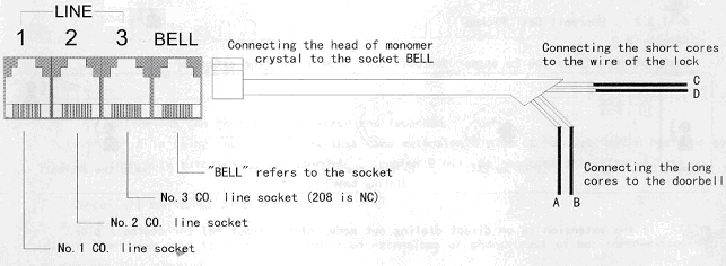
DoorBell & Door Lock To meet the need of our customers, two additional functions TALK-BACK DOORBELL & ELECTRON- CONTROLLED LOCK are adapted to 308A , which are convenient for you to use as door bell and auto- matically to open/close your door, The products are suitable for the offices and villas. Connection: Put one head of the RJ11 jacks (four-cores inside the connecting line equipped with the units) into the socket BELL of the external line, then connect the two long cores with the doorbell and the left two short cores with the power switch of the electron-controlled locked. Please refer to the below sketch map:
<1> For the doorbell, ours are available for their small dimension, nice appearance, good tone and easy installation <2> Connect the wire of the electron-controlled lock, which are available in the market, to the location C & D.
Ringing Extension Assignment Format: *14abcd# Explanation: [a,b,c,d] stands for the last digits for the ringing extension Description: Assign the extensions which will ring when doorbell calls. Example: If you want extension 802,803 & 807 will ring at he same time. Any extension will be available for conversation. Pick up 801 input *14237# “Du” Hang up Thus a visitor press the doorbell, the extension 802, 803, 807 will ring at the same time, Any extension will be available for conversation.
Answering the call Answering the Doorbell call from the ringing extension. Format: When doorbell calling pick up extension Answer the doorbell call
Doorbell call pickup Format: #7 Description: Allow you to answer doorbell call from a non-ring extension. If the extension is at direct dialing out mode, please input *#7 for doorbell pick.
To open the lock For the call by doorbell Format: Pat the hook and press #00 Remote open door Format: #4 If the extension is at direct dialing out mode, please input *#4 for open the door. |
||||